Overview
Telepathy is an autoclicker for Minecraft Bedrock on Windows 10 and 11. You set a range of clicks per second (CPS) and press the toggle key (F6 by default) to arm it. Then hold a mouse button in game and it clicks for you. Let go and it stops.
Left and right click each have their own switch, CPS range and mode. Telepathy only clicks while the game is the window in front. You pick the game by window title or program name; the default is "Minecraft, Cinnabar".
It can click in two ways:
- External sends mouse clicks to the game window, like other desktop autoclickers. Here a button can also be set to Always on: the toggle key alone then starts and stops the clicking.
- Internal runs Telepathy as a mod inside Cinnabar, a Bedrock client. The mod can see what you're aiming at, so it stops on blocks and your mining works as normal. It only clicks while you hold the button.
Editions
Telepathy comes in two editions. Both have the external clicker with the same basics: hold to click or always on, separate left and right settings, a CPS range from 1 to 1000, the toggle key and the window filter.
| Feature | Telepathy | Telepathy Lite |
|---|---|---|
| External clicking | Yes | Yes |
| Internal mode (Cinnabar mod) | Yes | No |
| Advanced tab | Yes | No |
| Click sounds | Yes | No |
Telepathy Lite is the plain external clicker. It always clicks with the Advanced defaults listed below: no timing jitter, no drift, a 25–55 ms hold, no cursor movement and no sounds. Telepathy with the Advanced tab left at its defaults clicks the same way.
Lite doesn’t know about Telepathy’s Cinnabar mod. If the mod is enabled in Cinnabar, don’t arm Lite in Cinnabar as well: with both on the same key, both would click. Telepathy’s own Internal mode turns its external clicker off for exactly this.
The CPS range
Each button has its own CPS range, anywhere from 1 to 1000 (1 to 30 in Internal mode). For every click, Telepathy picks a rate inside the range: most often near the middle, less often near the ends. A range of 10–14 averages 12 CPS and varies a little from click to click. Set min and max to the same number for a fixed rate.
The gap from one click to the next is 1000 ÷ CPS milliseconds: 100 ms at 10 CPS, 50 ms at 20 CPS. The Advanced settings change how the rate is picked, how much each gap varies, and how each click is pressed.
Advanced settings
The Advanced tab is in Telepathy only. Its settings apply to both buttons in External mode. In Internal mode the mod inside Cinnabar does the clicking with its own timing, and these settings don't apply. Reset defaults on the tab sets them all back to the defaults below.
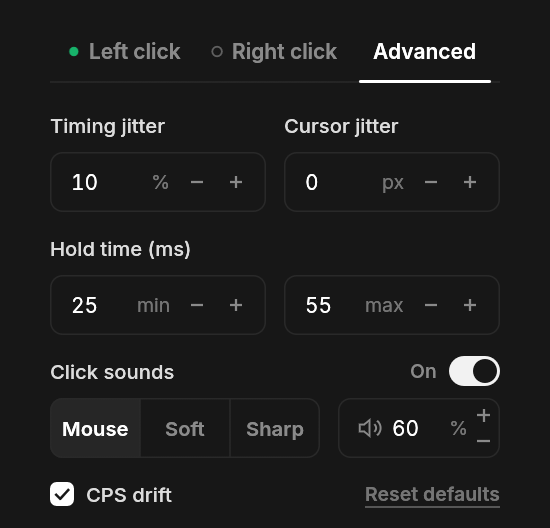
| Setting | Range | Default |
|---|---|---|
| Timing jitter | 0–50% | 0 (off) |
| CPS drift | On or off | Off |
| Hold time | 5–200 ms | 25–55 ms |
| Cursor jitter | 0–10 px | 0 (off) |
| Click sounds | On or off | Off |
These settings change how clicks feel and sound. They don't stop servers from detecting autoclickers: see On servers.
Timing jitter
- Range
- 0–50%
- Default
- 0 (off)
Adds random spread to the gap before each click. The CPS range picks a gap, then jitter stretches or shortens it by a random amount. At 20%, about two in three gaps end up within 20% of the picked gap, and the rest land further out. No gap is ever less than half or more than double the picked one.
The spread is balanced, so single gaps vary more but your average CPS stays about where the CPS range puts it.
With a fixed rate (min equal to max), jitter is the only thing that varies the timing. At 12 CPS with 20% jitter, gaps fall mostly between about 67 and 100 ms instead of always 83 ms. With a range, jitter adds to the range's own variation, so single clicks can come faster or slower than the ends of the range.
In detail: each gap is multiplied by a random log-normal factor with a mean of 1 and a standard deviation of the setting, limited to 0.5–2×.
CPS drift
- Options
- On or off
- Default
- Off
Off: every click picks a new rate from the CPS range, most often near the middle. Neighbouring clicks can differ a lot, but over any second the rate stays close to the middle.
On: the rate moves gradually through the range instead. It might run near the top for a second or two, then slide toward the bottom and back. Crossing from one end to the other usually takes a few seconds. Neighbouring clicks stay close in rate, with a little spread on each click. The rate turns back at the ends, so it never leaves the range, and over time it averages near the middle.
With drift on, the rate spends more time near the top and bottom of your range than with it off, so make sure every rate in your range suits you. Drift needs room to move: with min equal to max it changes nothing. Timing jitter still applies on top, varying each gap around the drifting rate.
In detail: the position in the range follows a random walk that is pulled back toward the middle (an Ornstein–Uhlenbeck process) and bounces off the ends.
Hold time
- Range
- 5–200 ms
- Default
- 25–55 ms
How long the button stays down for each click: the time between the press and the release. Every click picks a hold time evenly between your min and max.
A hold is never more than 60% of the gap to the next click, so the button is always up for at least the other 40%. At higher CPS this limit shortens holds by itself:
| CPS | Gap | Longest hold |
|---|---|---|
| 10 | 100 ms | 60 ms |
| 12 | 83 ms | 50 ms |
| 16 | 62.5 ms | 37.5 ms |
| 20 | 50 ms | 30 ms |
| 30 | 33 ms | 20 ms |
| 50 | 20 ms | 12 ms |
To use your whole hold range, keep the max hold below the limit at your top CPS: about 600 ÷ max CPS, in milliseconds. For a 10–16 range that's 37.5 ms. With a higher max, longer holds get cut to the limit and part of the range goes unused. Leave some room if you use timing jitter, since it makes some gaps shorter.
Cursor jitter
- Range
- 0–10 px
- Default
- 0 (off)
While clicking, Telepathy moves the cursor by small random amounts, up to this many pixels away in any direction. When the clicking stops, it moves the cursor back by the same amount, so only your own mouse movement is left. If a menu opening or a switch to another window stopped the clicking, it leaves the cursor where it is instead, so that move doesn’t land in the menu or the other window. When both buttons click at once, only one of them moves the cursor. At 0 the cursor is left alone.
In games that use the mouse to look around, like Minecraft in first person, moving the cursor turns your view. Cursor jitter then makes your aim wander a little while you click. How far depends on your in-game sensitivity, so start at 1 or 2 px and check that your aim still feels right.
In menus and inventories it moves the pointer, which can slide off the slot you're clicking. Turn on Pause in menus to stop clicking while a menu is open.
Click sounds
| Option | Choices | Default |
|---|---|---|
| Click sounds | On or off | Off |
| Sound | Mouse, Soft or Sharp | Mouse |
| Volume | 0–100% | 60% |
Plays a click sound for every press and every release Telepathy sends, in time with them. Each click is two sounds, press and release, spaced by the hold time, like a real mouse button. Every sound starts the same short time after its click (about 35 ms, a little more on a busy PC, plus your sound card’s own delay), so the sounds keep the exact rhythm of the clicks. With Hold to click, the press that starts the clicking is your own and you hear your mouse, so the first sound is the release Telepathy sends after it.
Without them, Telepathy's clicks are silent: you only hear your own mouse when you press or let go of it.
The sounds play on your PC like any other app's sound, so other players only hear them if your microphone picks them up. At high CPS they run together into a buzz; turn the volume down or switch them off.
How they combine
For each click, Telepathy:
- Picks the rate: fresh from the CPS range, or the drifting rate if CPS drift is on.
- Turns it into a gap (1000 ÷ CPS ms) and stretches or shortens that gap with timing jitter.
- Picks a hold time from your hold range, cut to 60% of the gap if it's longer.
- Presses the button, waits out the hold, releases it, and waits out the rest of the gap. With click sounds on, a sound plays with the press and with the release.
Cursor jitter runs alongside for as long as the clicking lasts.
For example, with 10–14 CPS, drift on, 20% jitter and a 30–45 ms hold, the rate wanders between 10 and 14 over a few seconds. Say it's at 12 CPS: the gap would be 83 ms, jitter makes this one 91 ms, and the hold comes out at 38 ms, under the 55 ms limit. The button is down for 38 ms and up for 53 ms, then the next click starts.
On servers
These settings change how clicks feel and sound. Servers can still detect autoclickers, and many ban them or limit CPS. Check a server's rules before you use Telepathy in multiplayer. Cinnabar also warns that anticheats may flag a modified client.